Founder-led product · Money management

Tune Hustle

A money management platform for independent beauty professionals. I started with service-pricing calculators and expanded into a dashboard for expenses, income goals, quotes, and client activity.

  • Founder, product designer & developer
  • AI-assisted web development
  • 2,190 active users · May–August 2026
Development journey & debugging
Tune Hustle · calculator walkthrough
See the live calculator flow Full walkthrough · 7:39 · Open video ↗ The walkthrough demonstrates entering service details, supplies, overhead, time, and margin, then reviewing price, take-home profit, hourly earnings, and total cost.
Dashboard in progress

Dashboard sneak peek

A silent walkthrough of the dashboard in progress, including client activity, goals, price menus, and saved calculations.

Dashboard in progressOpen video in a new tab
01 Organic traffic

Organic traffic, without paid advertising

I built Tune Hustle’s early audience without paid advertising. From May 24 to August 21, 2026, the calculators reached 2,190 active users. Google organic search was the leading source of traffic, followed by direct visits, with the largest audience in Latin America.

Active users
2,190
90-day window
Result events
1,296
Core product action
Engagement rate
76.91%
Across channels
Avg. engagement
2m 12s
Per active user
Acquisition

How people found the product

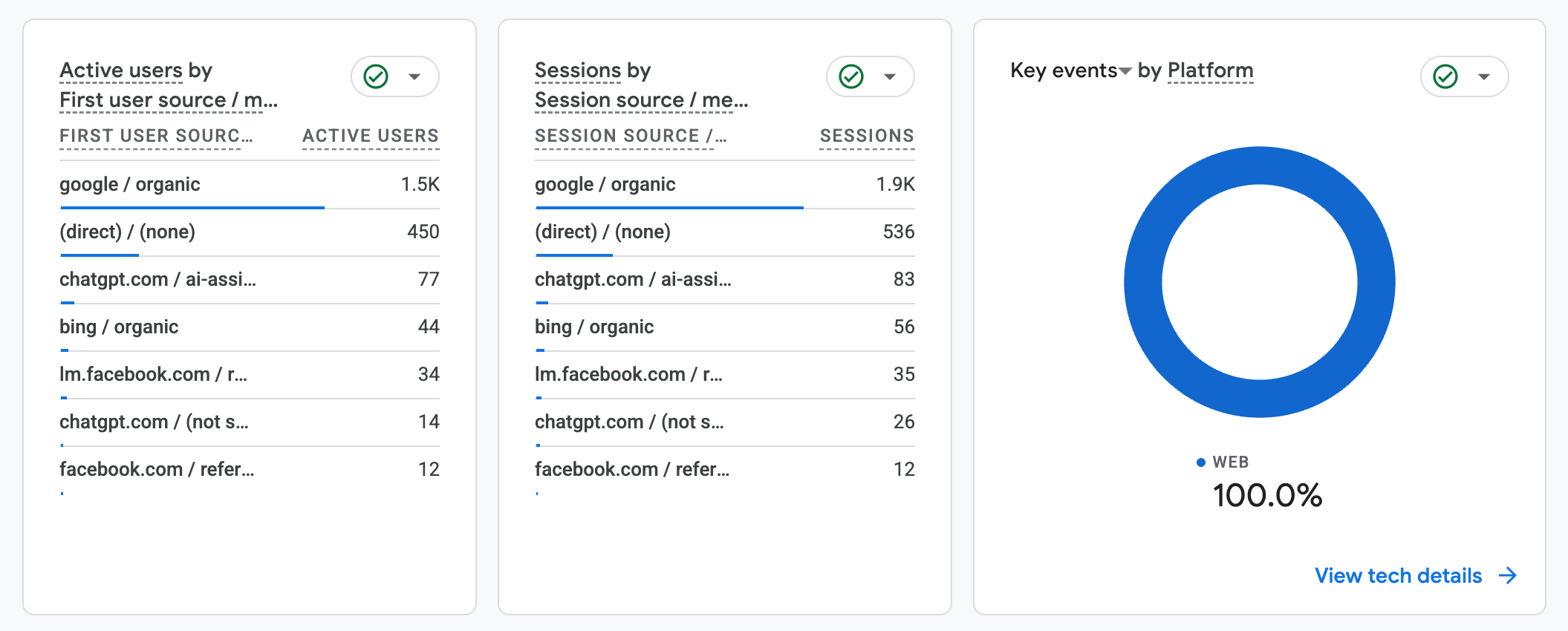
Google organic search was the largest source of active users and sessions, ahead of direct traffic. The source report below shows how people discovered the calculators.

Google Analytics source report showing Google organic as the leading source of active users and sessions
Organic search leads source-level acquisitionFull report · click to inspect
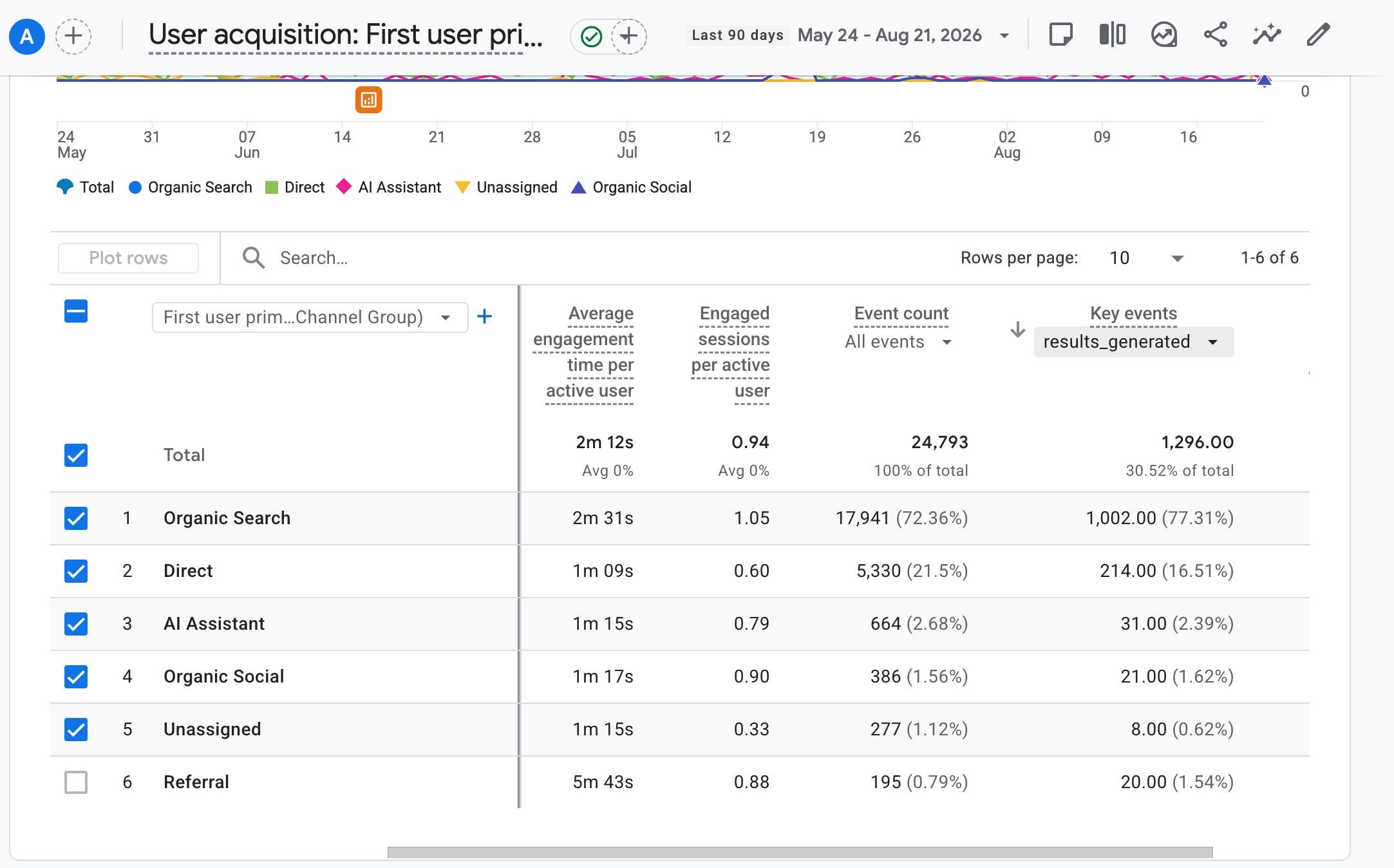
1,002 / 1,296

Result events came predominantly from organic searchOrganic search generated 1,002 of the 1,296 recorded result events, or 77.31% of the core action in this window.

Behavior

What visitors did after arriving

Result events show visitors reaching the calculator output rather than only viewing the landing page. They indicate use of the core interaction, not purchases or unique completed customers.

Google Analytics acquisition report showing 1,296 results-generated events and organic search as the leading channel
Product behavior by acquisition channelFull report · click to inspect
Returning users

Make the next visit easier, after the first useful result

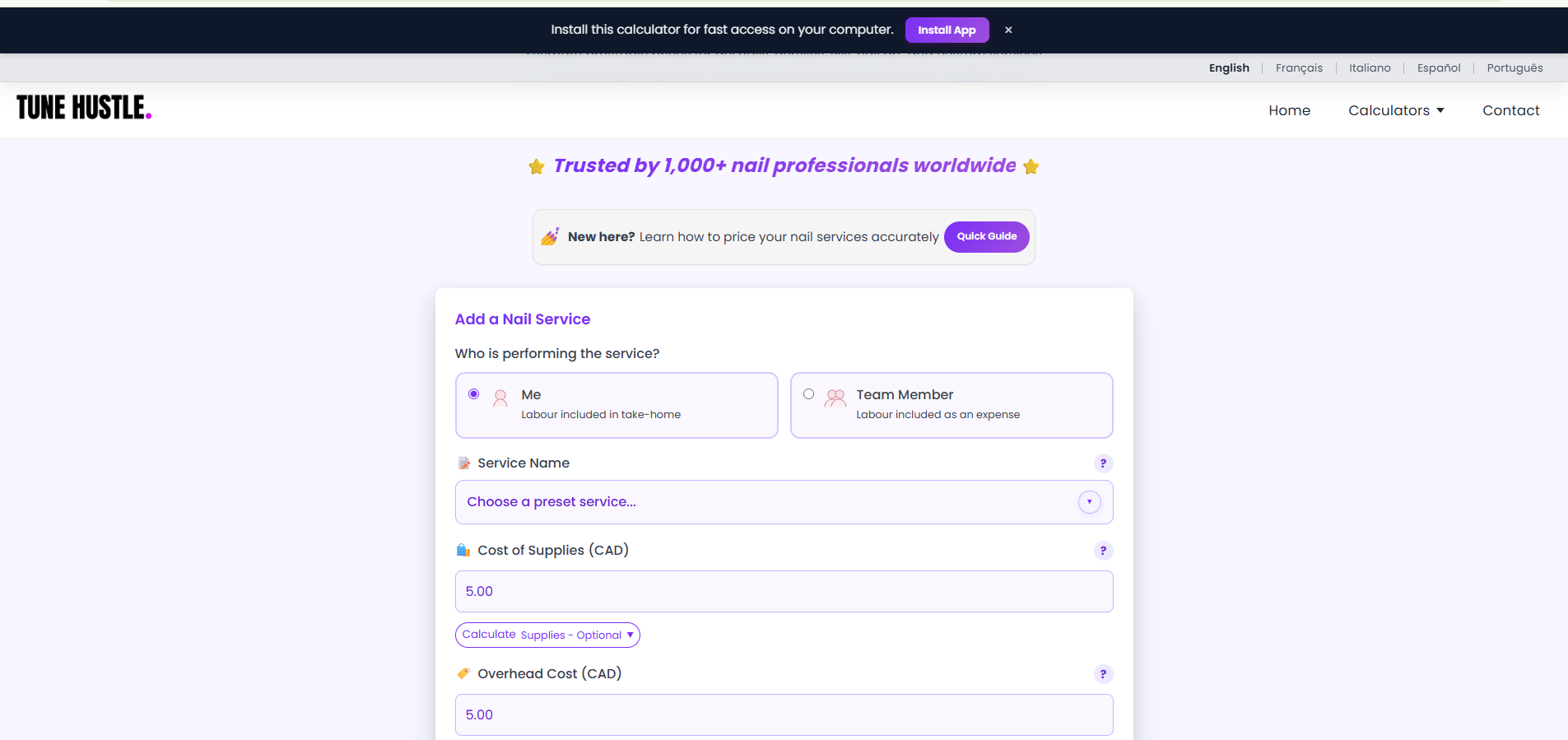
I added an install-app banner for Tune Hustle’s progressive web application (PWA) to encourage repeat use. It appears six seconds after the first completed calculation in each session, once the result is visible. This gives people time to experience the calculator’s value before deciding to install it for faster access.

Tune Hustle nail calculator with an Install App banner offering fast access on a computer
Invite installation after delivering valueFirst calculation · result shown · six-second delay
237

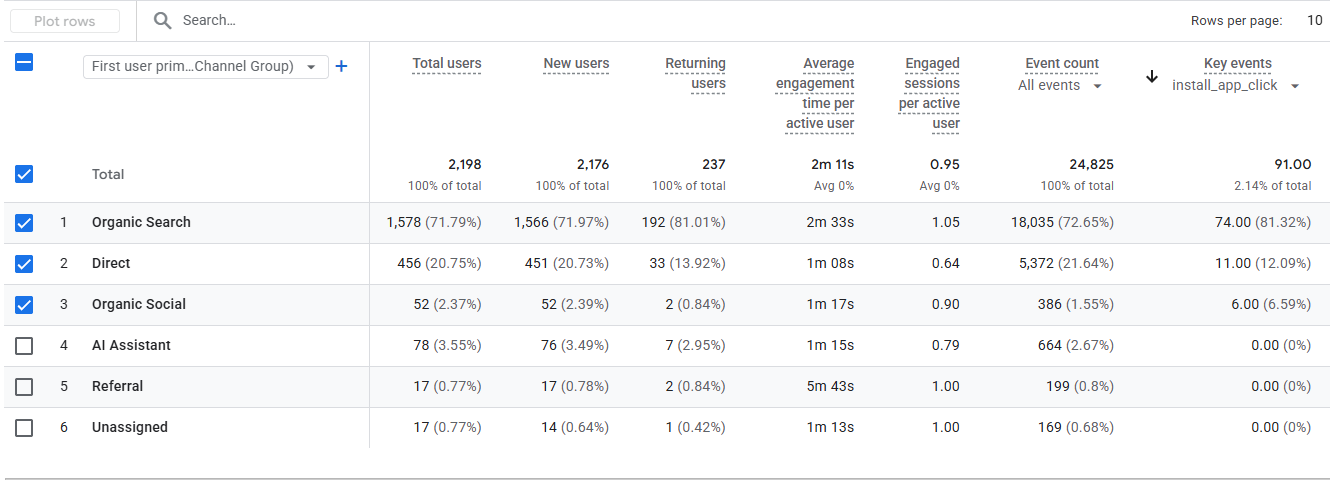
Returning users recorded in GA4The report below also records 91 install_app_click key events, including 74 from organic search. I track this interest in faster access alongside return visits as early signals of repeat use.

Google Analytics acquisition report showing 237 returning users and 91 install_app_click key events, including 74 from organic search
Interest in installing the PWA91 install-button clicks · 74 from organic search

What these signals tell me: an install_app_click records a click, not a confirmed installation. These reports show return visits and interest in installation; they do not isolate how much the banner contributed to those return visits.

Reach

Where the early audience came from

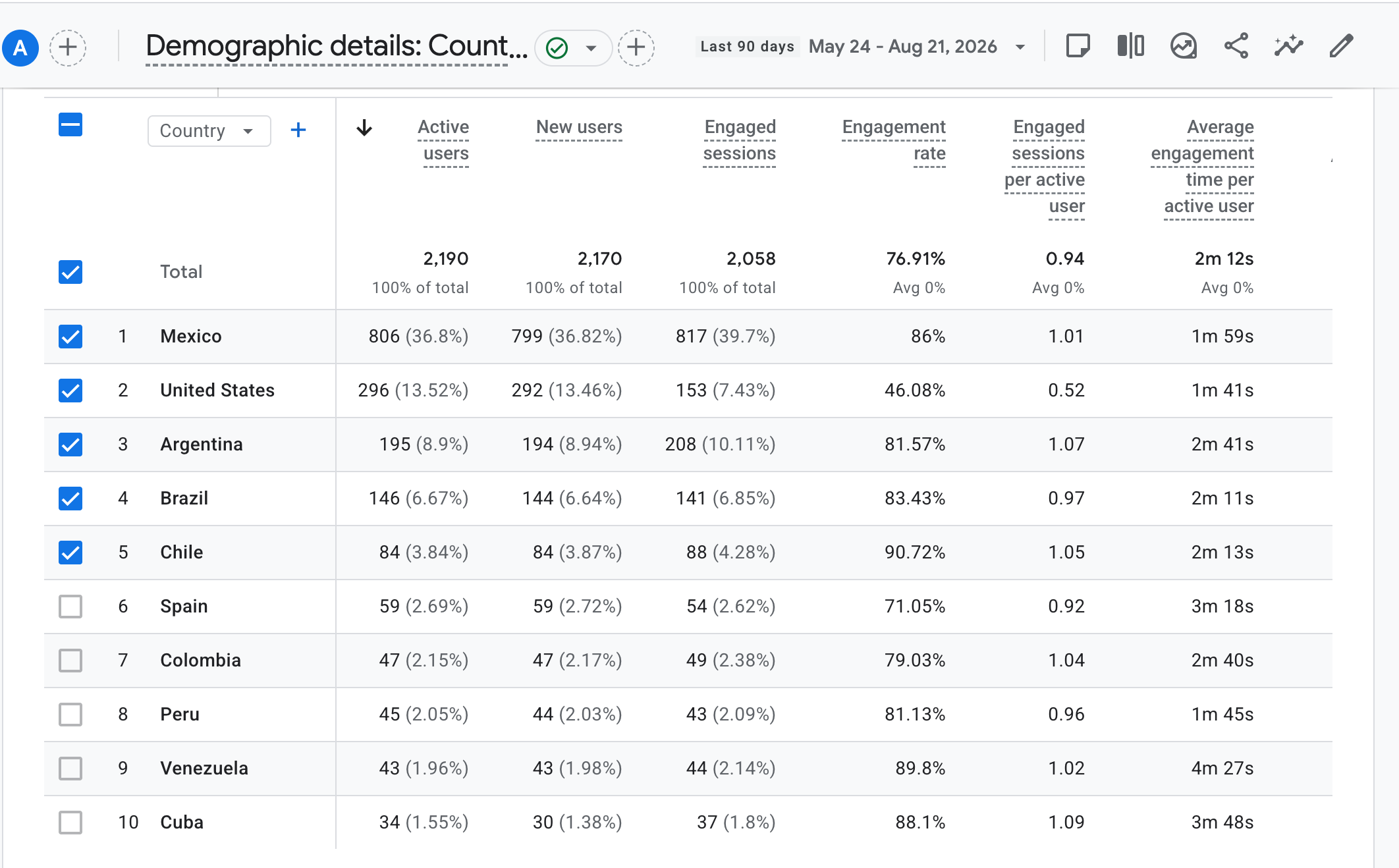
Usage extended beyond one local market. Mexico led the country report, followed by the United States, Argentina, and Brazil, making Latin America the clearest early concentration.

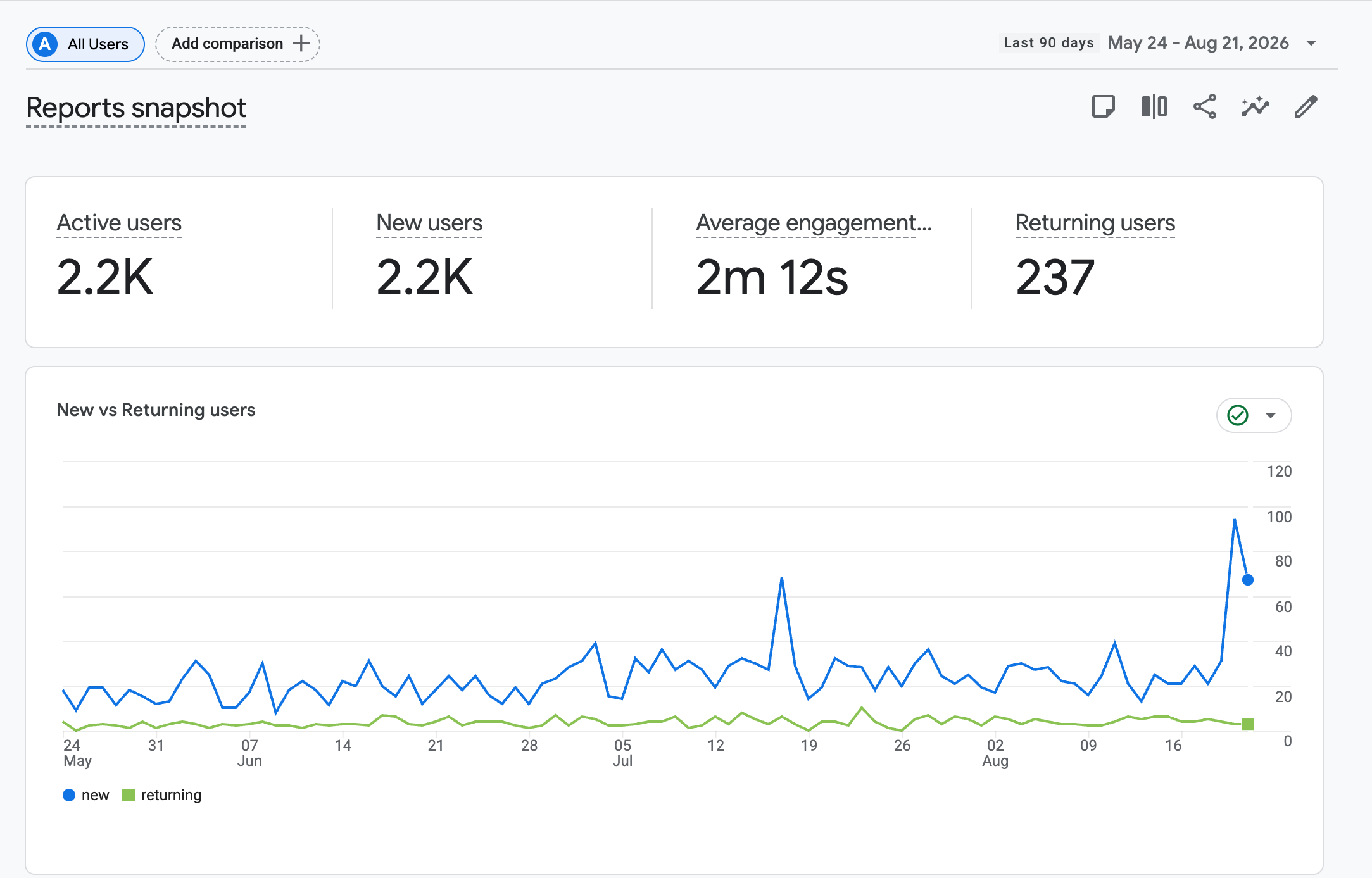
Google Analytics overview showing active users, engagement time, and returning users
Audience and return behavior2,190 active · 237 returning users
Google Analytics country report showing international use led by Mexico, the United States, Argentina, and Brazil
International reachAudience led by Latin America

Reading the evidence honestly: a result event is an event count, not a unique person, purchase, or retained customer. These figures show discovery and use of the calculator's core action; they do not yet prove revenue, long-term retention, or full product-market fit.

Case study at a glance

From service pricing to everyday money management

I started with a calculator that offered a quick answer to a pressing pricing problem: covering supplies, overhead, and working time while leaving a sustainable profit. It helped independent beauty professionals understand what to charge, what they would take home, and what they would earn per hour.

As people used the calculators, I tracked key events such as generating a result. Seeing visitors reach that answer gave me an early signal that the tool was addressing the pricing need, and encouraged me to build on it.

I decided to create an easy-to-use money management platform for independent beauty professionals, connecting their calculations with clients, income goals, expenses, quotes, and price menus. The aim is a lean solution to their everyday money management needs. The dashboard remains in active development, testing, and refinement.
  • RoleFounder, product designer, developer
  • Live nowPhone-first beauty pricing calculators
  • Working dashboardAccount-based tools, actively evolving
  • Early evidence2,190 active users · 90 days
02 Why I built it

The price looked simple; the real calculation was not

The idea started from a recurring gap I noticed in service pricing: products and market rates are easy to discuss, while shared expenses, working time, and a sustainable margin are easier to miss. I created Tune Hustle to put the whole calculation in one clear, phone-friendly flow.

The decision behind the product
“What should I actually charge for this service?”

The first release begins with the answer someone needs today. It does not require a complete business system before it becomes useful.

A sustainable price is four inputs—not one guess

03 How I narrowed it

Three constraints shaped the first release

The broader idea could have become a large business-management platform immediately. I deliberately narrowed the first audience, removed setup work, and made the result explain itself.

01

Beauty first, not everyone at once

Nails, lashes, brows, PMU, waxing, and salon services share a repeatable cost structure: consumables, appointment time, and overhead. That made beauty a focused starting point rather than a limit on the longer-term idea.

Narrow the audience
02

A guided flow, not spreadsheet flexibility

Spreadsheets can model anything, but they also require formulas, custom tabs, and upkeep. Tune Hustle trades that flexibility for a clear sequence where every field connects to the pricing decision.

Reduce setup
03

Show the math, not only the answer

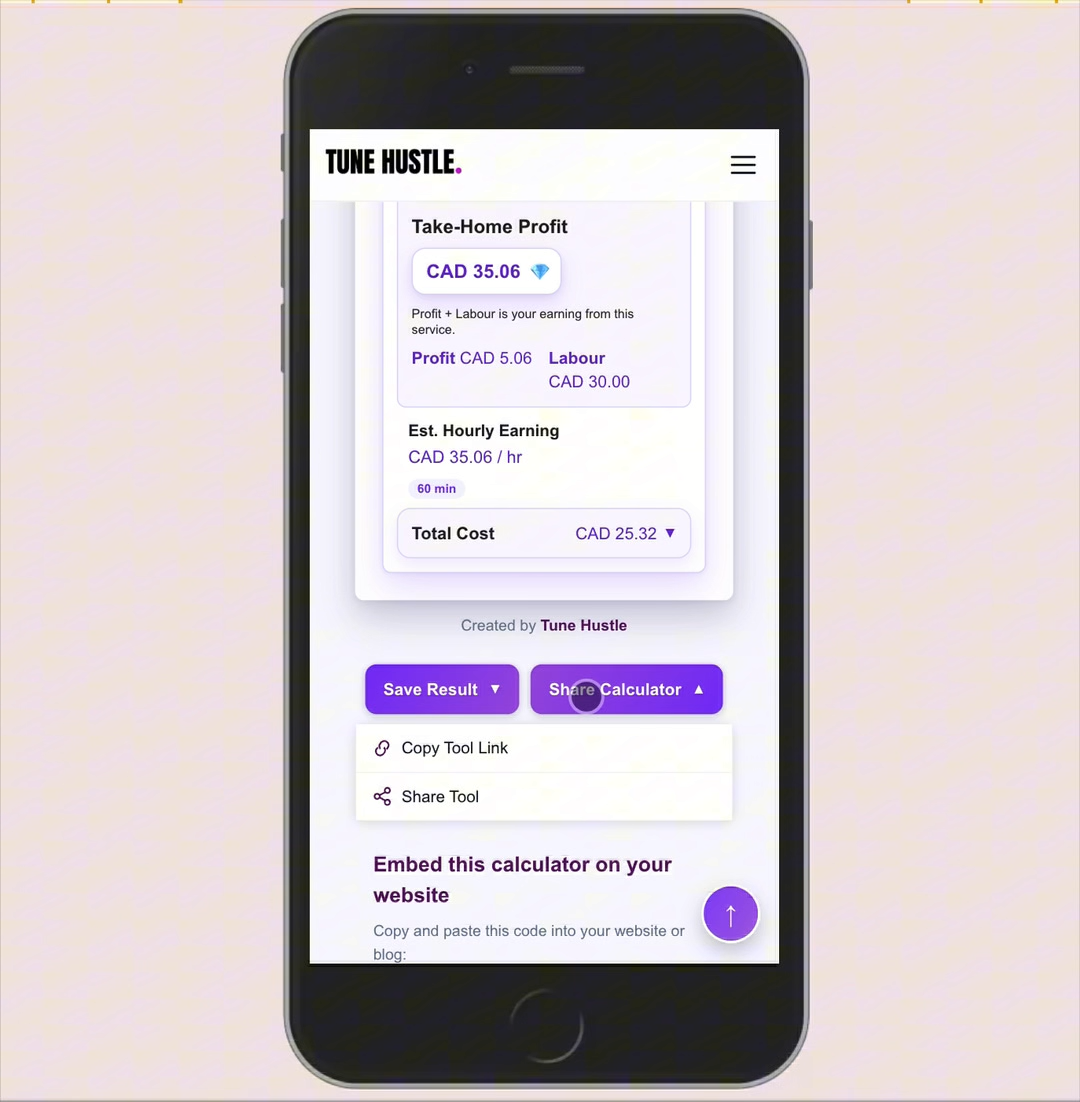
The result separates total cost, take-home profit, labour, and estimated hourly earnings. The aim is to help someone understand the recommendation and make a decision—not simply accept a generated number.

Build trust through clarity
04 What shipped

The calculators turn hidden costs into an actionable result

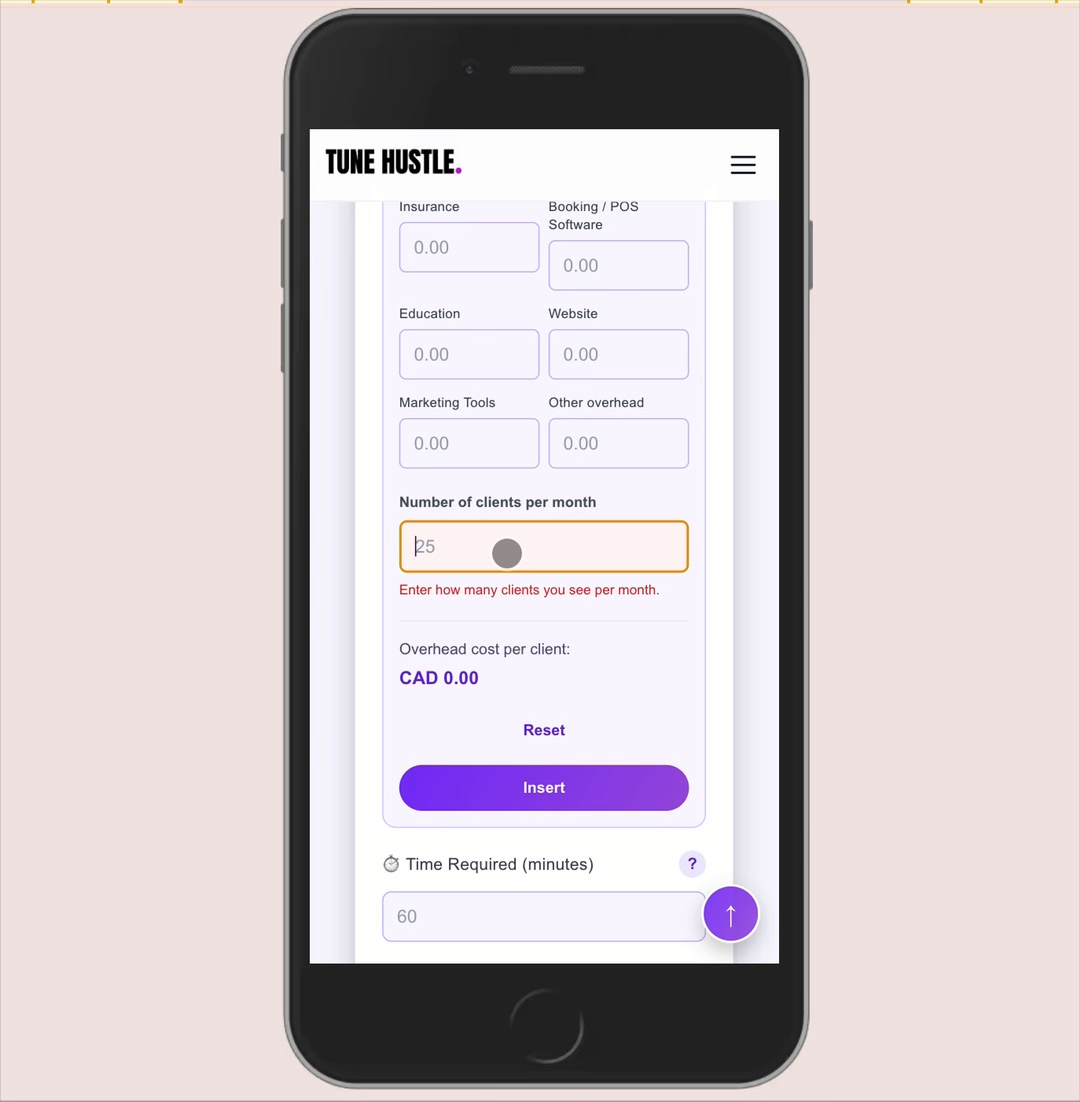
The shipped flow converts monthly overhead into a per-client cost, keeps labour and profit visible, and presents price, hourly earnings, and total cost together. Results can also be saved or shared from the interface.

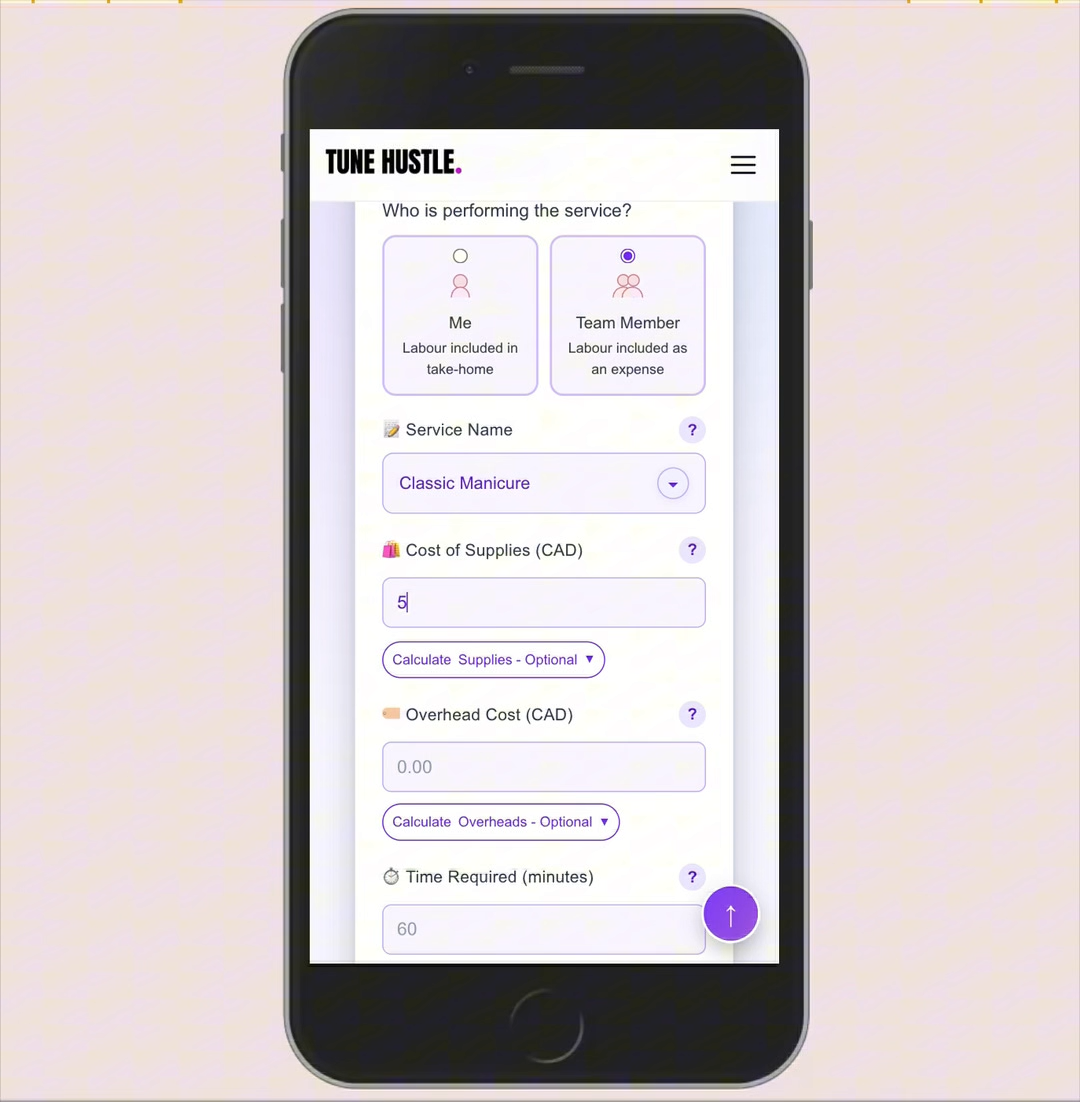
Tune Hustle calculator fields for the service name, supplies, overhead, time, and who performs the service
01 · Enter the serviceStart with real supplies, time, and working context.
Tune Hustle overhead calculator with fields for insurance, software, education, marketing, and monthly clients
02 · Surface hidden costsTurn shared business expenses into a per-client amount.
Tune Hustle result showing take-home profit, hourly earnings, total cost, and options to save or share
03 · Review the resultConnect take-home profit, earnings, and total cost.
05Building & maintaining

From early VS Code builds to a maintained product

I started Tune Hustle in Visual Studio Code with GPT-4 helping me work through implementation. The project has grown through repeated decisions, testing, and revisions as I learned what the product needed.

  1. By September 2025 · Early versions

    A hands-on HTML, CSS, and JavaScript workflow

    I worked with local files in Visual Studio Code and used GPT-4 for implementation help, reviewing the result and refining the visual design and behaviour.

  2. Calculator release · Public use

    A focused tool people could use without an account

    The beauty calculators brought supplies, overhead, time, and pricing into a guided flow. Analytics then gave me evidence about discovery, calculator use, and the audience.

  3. 2026 · Dashboard and release work

    From a one-time answer to saved business activity

    I expanded the scope into saved calculations, menus, quotes, goals, expenses, and clients. The workflow now includes GitHub review branches, Cloudflare previews, and checks before production releases.

A real debugging example · October 2026

Keeping quote sharing usable when an operation fails

The quote editor had to remain understandable through saving, publishing, and retrying. This example comes from the AI-assisted implementation and its recorded regression checks.

What broke
The Review & share sheet could close while it was still preparing. Nested publish or withdraw confirmations could also leave keyboard focus on a control that had disappeared or become unavailable.
How it was investigated
The review followed the asynchronous save and publish sequence, comparing busy states, open dialogs, and the available focus targets. The actual editor was exercised with controlled delays and failed requests.
What changed
The fix guards dismissal during preparation, keeps confirmation feedback visible, and restores focus to an available control without overriding a newer user action. Cached module versions were updated with the change.
How it was checked
The change added 14 editor integration checks covering save-before-publish, nested confirmations, repeat actions, recovery, and lost acknowledgements. These use simulated boundaries; rendered browser behaviour is a separate review.

My role: I set the expected user experience and release priorities, review the behaviour and test evidence, and request corrections. AI-assisted code changes and automated checks support that review.

How I take changes toward production

  1. Define the changeI specify the expected flow, review screenshots and browser behaviour, and request corrections, including mobile checks.
  2. Review on a branchChanges are saved to GitHub and reviewed through Cloudflare previews. I ask for test evidence alongside the visible result.
  3. Approve and verifyI approve publishing after review. The release workflow checks the intended commit, deployment result, and affected live flow.
  4. Keep recovery practicalGit history preserves earlier versions. When a check fails, the change is corrected and rechecked before moving on; I do not treat a successful build alone as proof the feature works.
06 What I learned

Calculator use shaped the next step

Tracking calculator use and result-generation events showed me that people were reaching the answer the tool was designed to provide. I took that as an early signal to extend its value into everyday money management.

How could the value of one calculation carry into the rest of a beauty professional’s working day?

That led me to connect saved calculations with clients, income goals, expenses, quotes, and price menus in one simple platform. The next question is whether this lean approach gives independent beauty professionals a useful reason to return.

Supported

Discovery, calculator use, and return visits

Organic acquisition, result events, and 237 returning users provide early evidence that people are finding the calculators, using the core output, and coming back.

Not yet proven

Repeat value and revenue

The data does not establish durable retention, paid demand, or product-market fit.

Next validation

A reason to return

The dashboard tests whether saved work, goals, and progress are more valuable than another isolated calculation.

07 Where it is now
Dashboard in progress

The dashboard connects pricing to day-to-day business activity

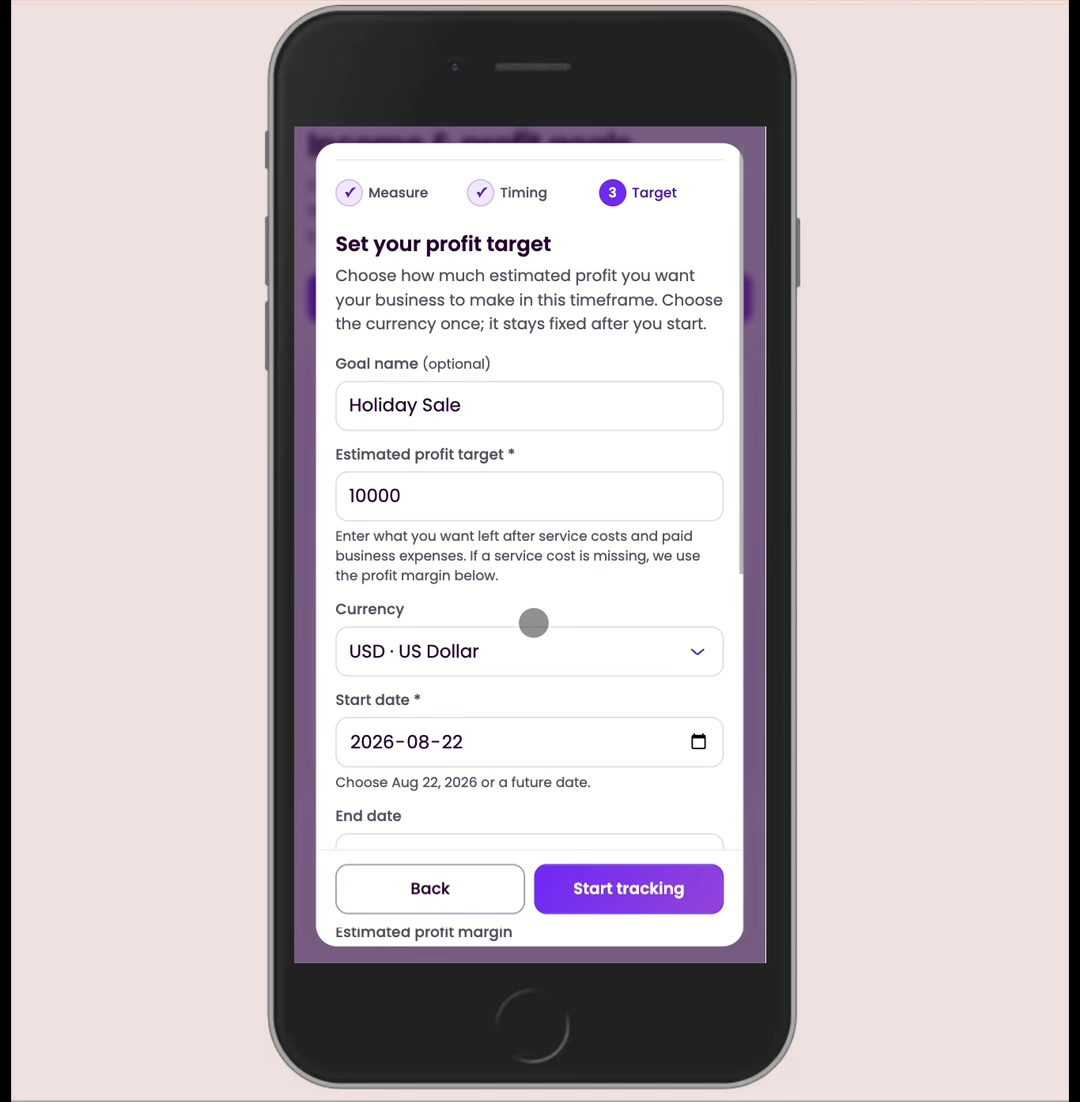
The dashboard brings saved calculations, clients, income goals, expenses, quotes, and price menus into one money management platform. I am refining how these tools connect so independent beauty professionals can carry a pricing calculation into their day-to-day business activity.

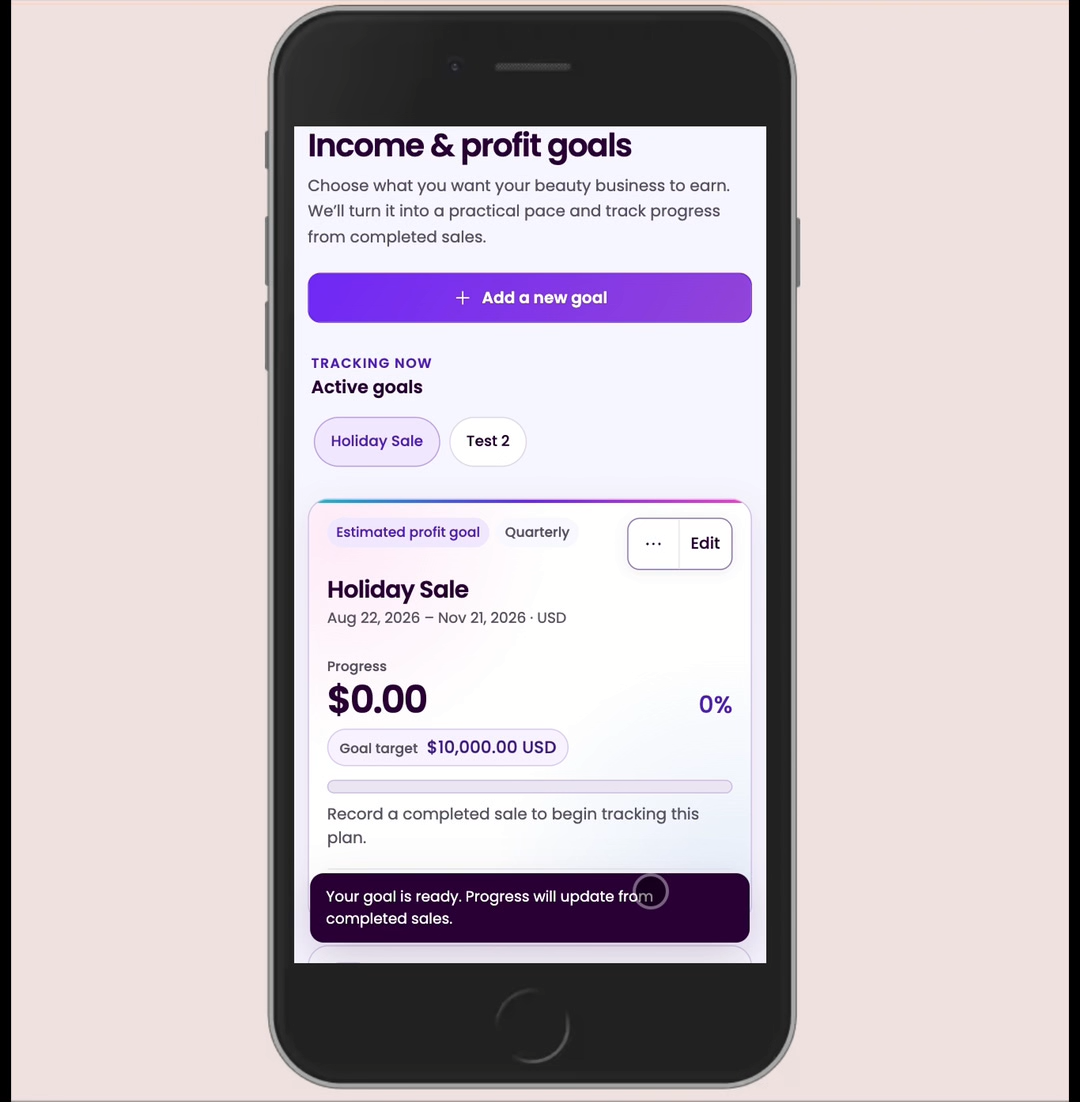
Tune Hustle dashboard implementation showing an active income and profit goal, target amount, progress, and completed-sales tracking
Active goal trackingGoal-tracking screen from the build

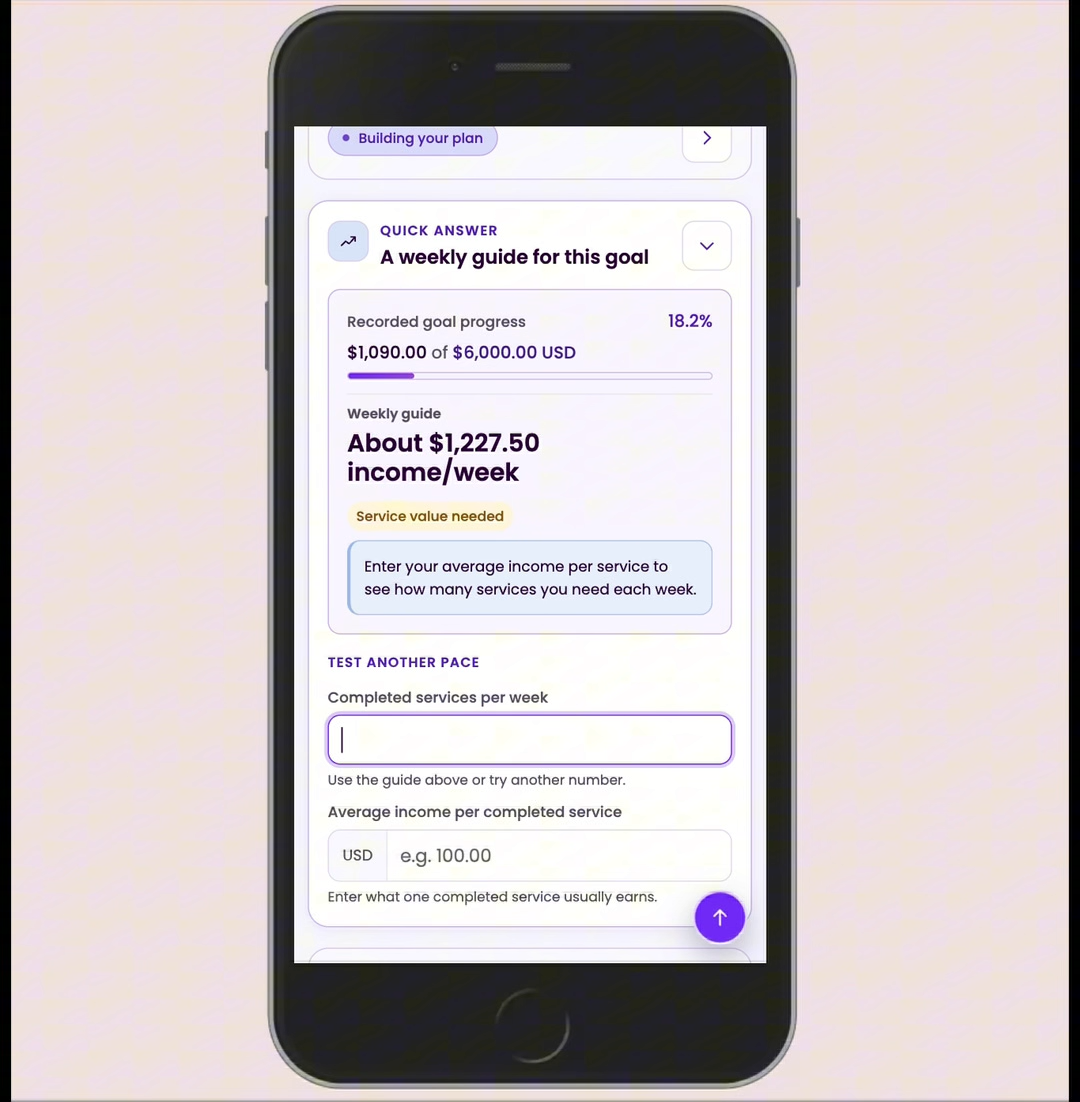
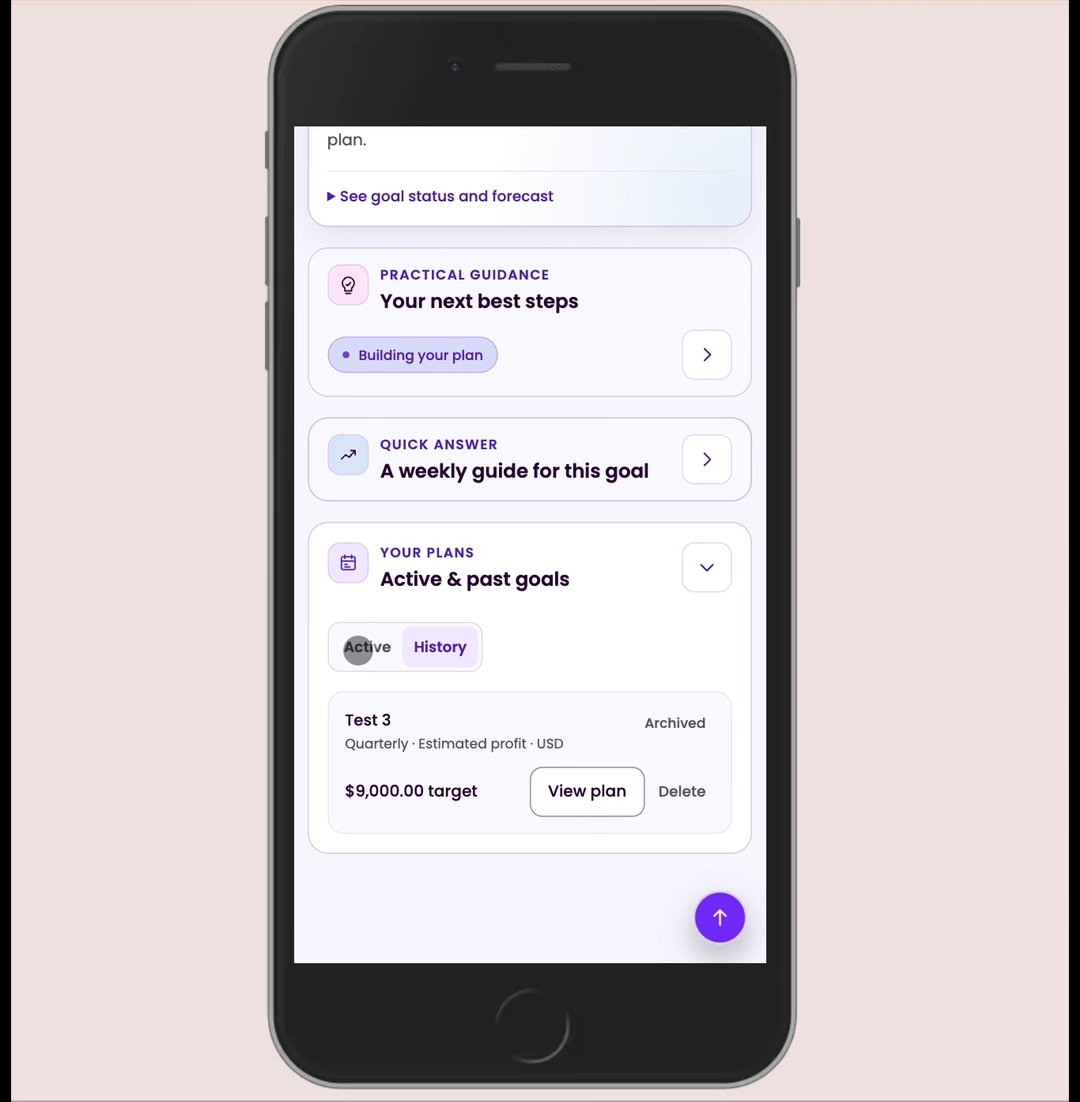
A closer look at the goals workflow

A persistent workspace that connects saved pricing decisions to financial goals and a practical pace of work.

  • Save the work already completedKeep calculator results and service-pricing decisions available for later use.
  • Set a time-bound income or profit goalChoose a target, currency, timeframe, and optional goal name.
  • Track progress from real activityUpdate a goal from completed sales and separately recorded outside income.
  • Turn a target into a weekly paceTranslate the remaining goal into income per week and the service volume needed.
  • Return to guidance and historyReview forecasts, suggested next steps, and active or archived plans.
  1. Live
    Free beauty pricing calculators

    Immediate help with service costs, overhead, time, earnings, pricing, and margin.

  2. Implemented
    Account-based business dashboard

    Saved work, menus, quotes, goals, expenses, and client activity, with ongoing testing and refinement.

  3. Later
    A wider independent-business toolkit

    Expansion beyond beauty remains deferred until the dashboard proves useful repeat behavior.

Status reviewed October 2026: the free calculators are public. The account-based dashboard is implemented and has been deployed, with sign-in and continued release testing. The walkthrough and goal screens above document that work; they are not evidence of dashboard adoption, revenue, or proven retention.

Continue exploring

More selected design work